Skip to content

For Windows 10 and 11 · Free

A dynamic island for Windows.

Dockie puts a small island at the top of your screen. Point at it and it opens. Drop files on it, find what you copied an hour ago, skip a song, or check the time in Tokyo, without leaving what you’re doing.

Free to use · Dockie Pro $9.99 once · No account

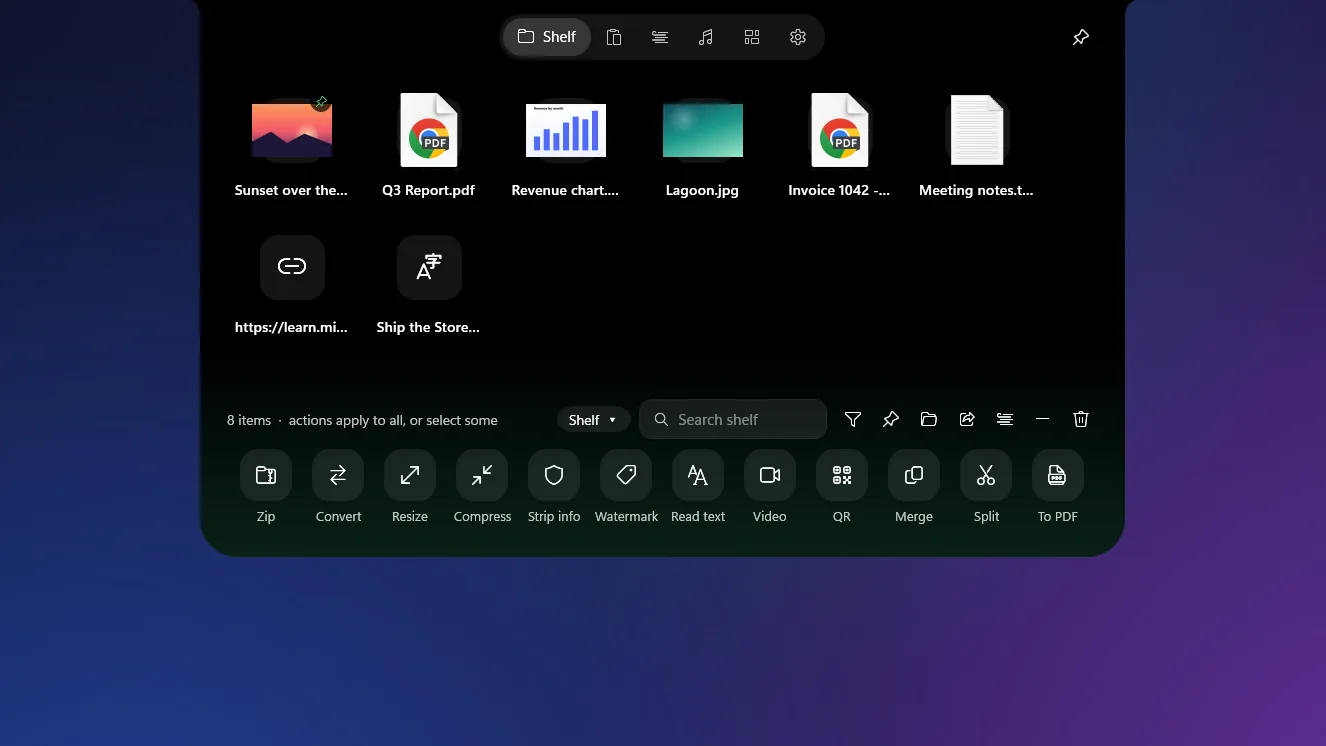
Dockie’s shelf open at the top of the screen, holding pictures, two PDFs, a text file, a link and a note, with a row of actions underneath: Zip, Convert, Resize, Compress, Strip info, Watermark, Read text, Video, QR, Merge, Split and To PDF.
  • Opens when you point at it

    Or press Ctrl+Alt+Space. It never takes the keyboard from your app.

  • Encrypted on your PC

    Clipboard history and Memory, with your Windows account.

  • Hides in fullscreen

    Out of the way of games, videos and presentations.

  • Pro is $9.99 once

    Tax included. One key for 3 PCs.

What’s on the island

Everything at the top of your screen.

Files, clipboard, memory, media, widgets and tiles, one point away. Parts marked Pro need Dockie Pro.

01Shelf

A shelf for files on the move.

Drop files, folders, text, links and pictures on the island, then drag them out to any app or folder when you need them. Shake the pointer while dragging and a basket opens right where you are.

  • Pin what you keep using
  • Share to your phone or a nearby PC through the Windows share window
  • Named shelves keep Work, Invoices or anything else apartPro

Removing an item from the shelf only takes it off the shelf. Dockie never deletes the file.
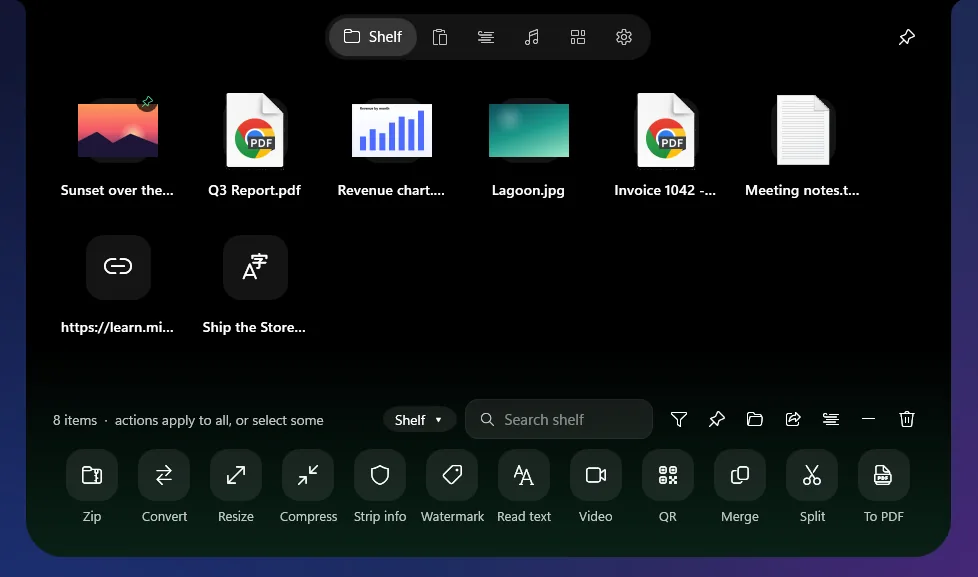
Dockie’s shelf open at the top of the screen, holding pictures, two PDFs, a text file, a link and a note, with a row of actions underneath: Zip, Convert, Resize, Compress, Strip info, Watermark, Read text, Video, QR, Merge, Split and To PDF.

Quick actions, all on your PC

Select items on the shelf and act on them. New files are written next to the originals, which stay as they are. Nothing is uploaded.

  • Zip

    Zip what’s on the shelf

  • Convert pictures

    PNG, JPG, WebP and HEIC

  • Resize and compress

    Without uploading anything

  • Strip info

    Strip location and camera data

  • PDF

    Merge or split PDFs, or turn pictures into a PDF

  • QR codes

    Make QR codes

  • Video and audioPro

    Convert to MP4 or MP3, compress, or fit a file under a size limit (uses ffmpeg)

  • Read textPro

    Text from pictures (OCR)

  • WatermarkPro

    Add watermarks

02Clipboard

Clipboard history you can trust.

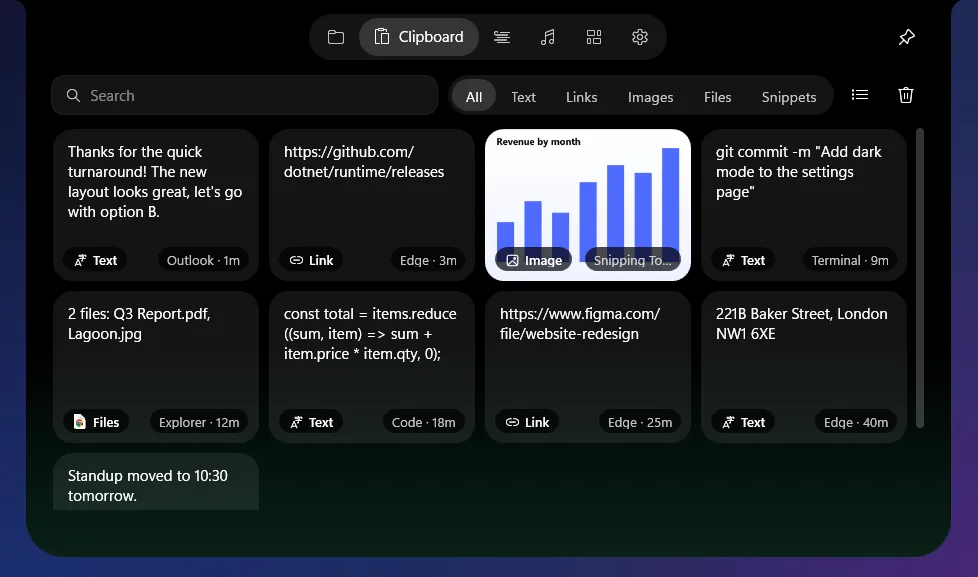
Everything you copy (text, links, pictures and files), searchable, filterable by app, and encrypted on your PC. Password managers’ private items are never recorded.

  • Paste any of the last ten with a shortcut
  • Snippets: type a short abbreviation and Dockie types the full textPro
  • Paste queue: copy several things in order, then paste them one at a timePro

Copies from apps you list under “Never keep copies from” are not recorded either, and capture can be paused from the tray.

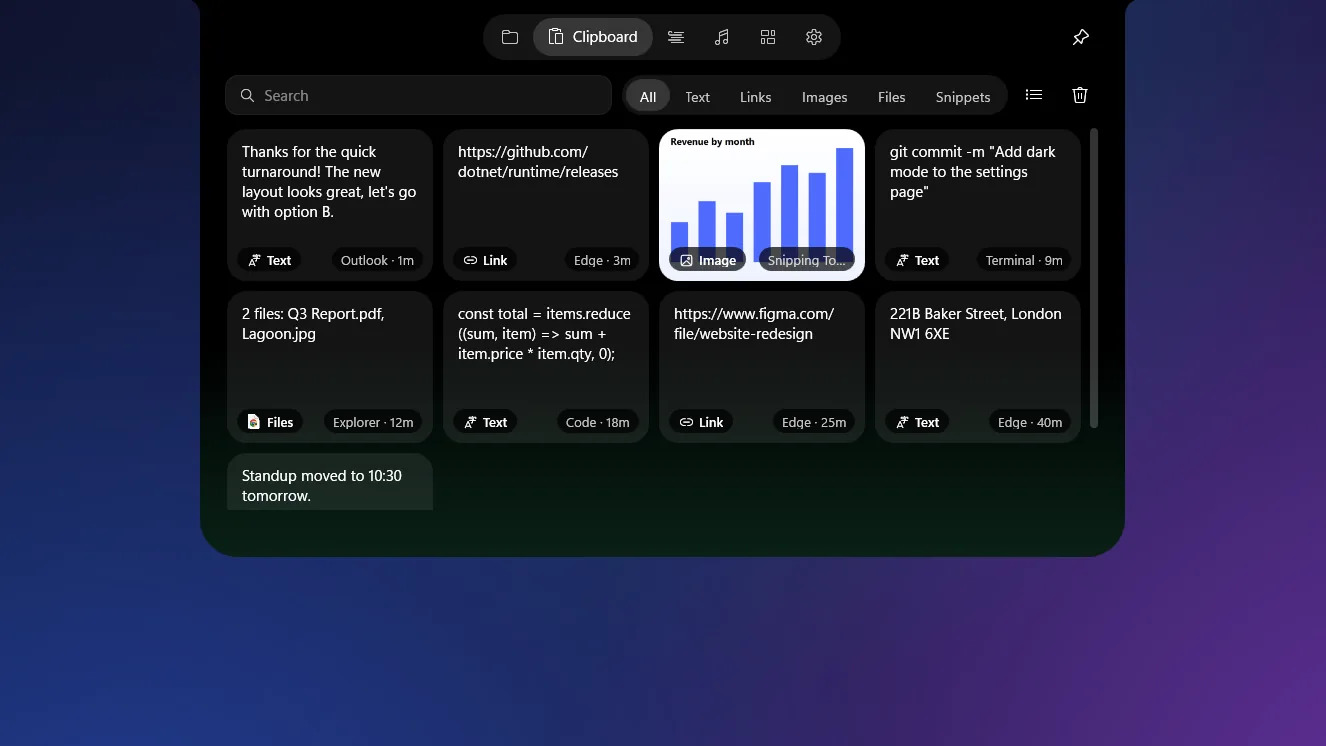
Dockie’s clipboard history: a search box, filters for Text, Links, Images, Files and Snippets, and cards for copied text, links, a chart picture and files, each with the app it came from and how long ago.

03MemoryPro

Memory, and search by meaning.

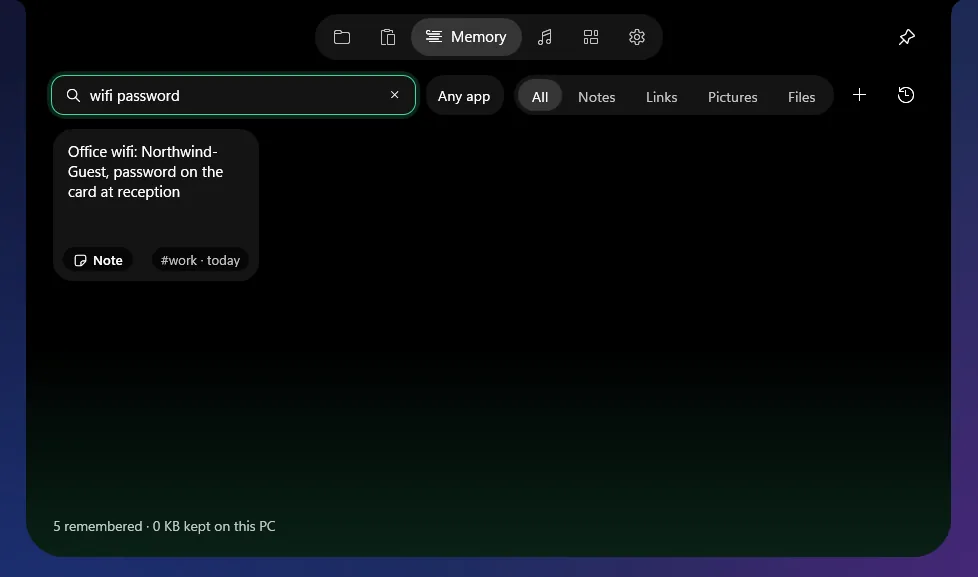
Keep anything you copy, drop or type for as long as you want, then find it again with one search over memory, clipboard and shelf, by words or meaning, including the text inside pictures and PDFs. Encrypted on your PC.

  • Smart search finds things by what they’re about, pictures included (“the invoice from Acme”, “blue chart screenshot”), with a model that runs on your PC
  • “More like this” on any item, and copies of the same thing folded into one
  • Forget one item, or everything from the last hour

Smart search is off until you turn it on. Its model (about 320 MB) is then downloaded once; nothing you copied or dropped is sent.

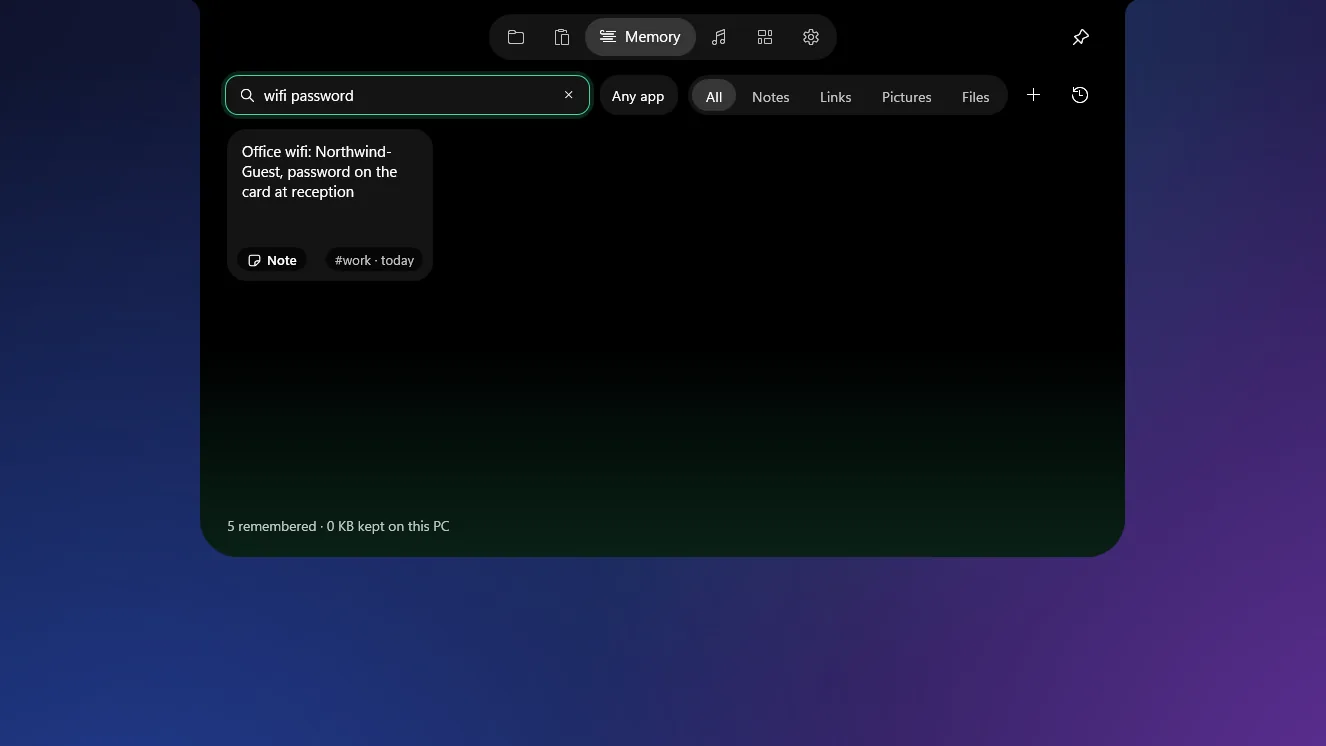
Dockie’s Memory tab searching for “wifi password” and finding a note about the office wifi, with filters for Notes, Links, Pictures and Files and a line saying how much is kept on this PC.

04Media

Media and sound.

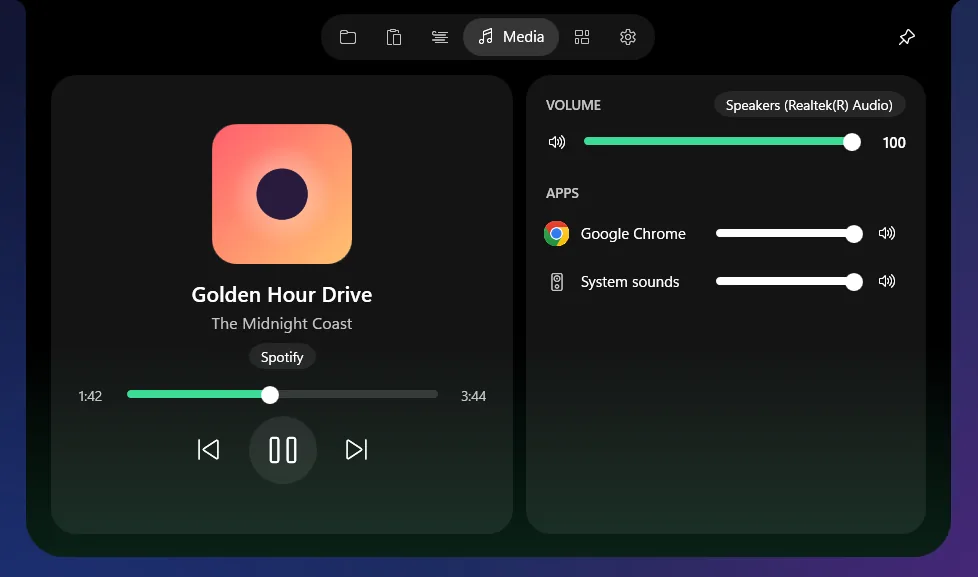
What’s playing in any app, with artwork, seek bar and controls. Master and per-app volume, and a quick switch between speakers and headphones.

  • A mark in the pill when an app uses your microphone or camera
  • A shortcut that mutes the microphone in every app
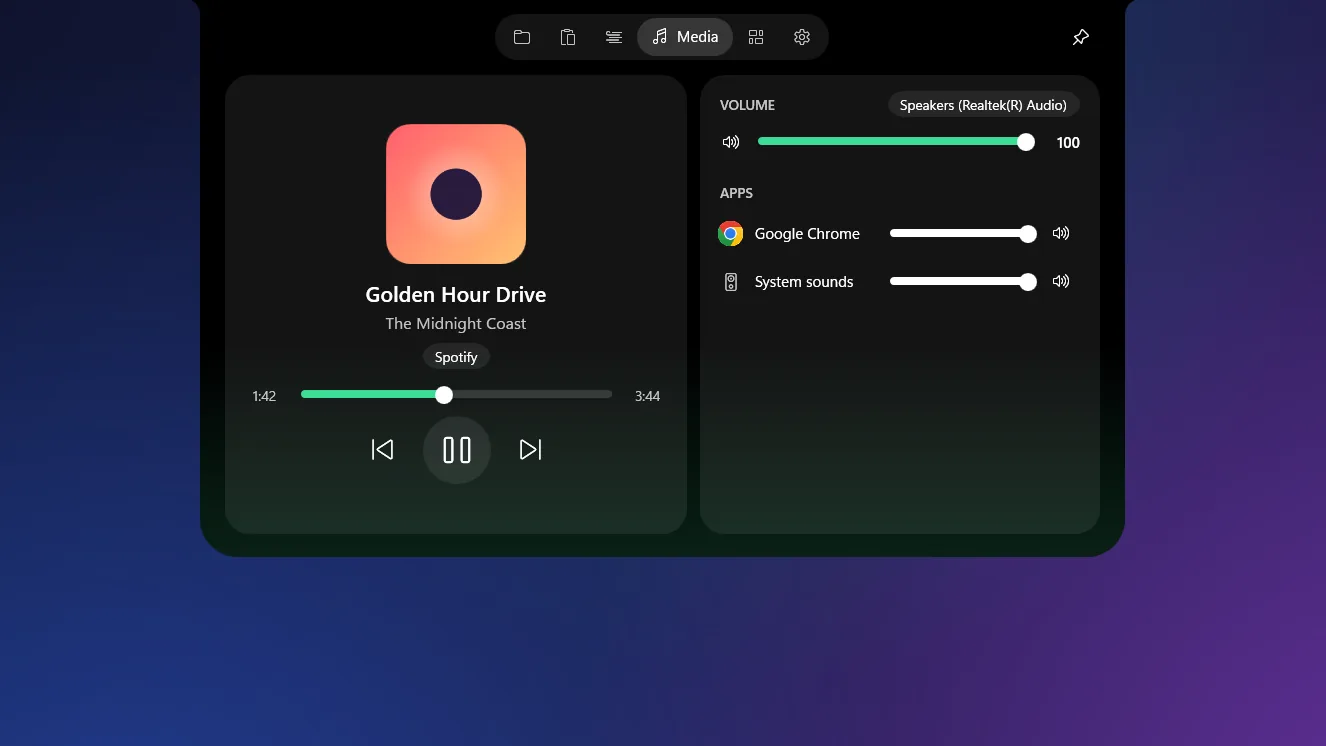
Dockie’s Media tab: a song playing in Spotify with artwork, a seek bar and controls, beside the master volume, the output device and volume sliders for each app.

05Widgets

Widgets at a glance.

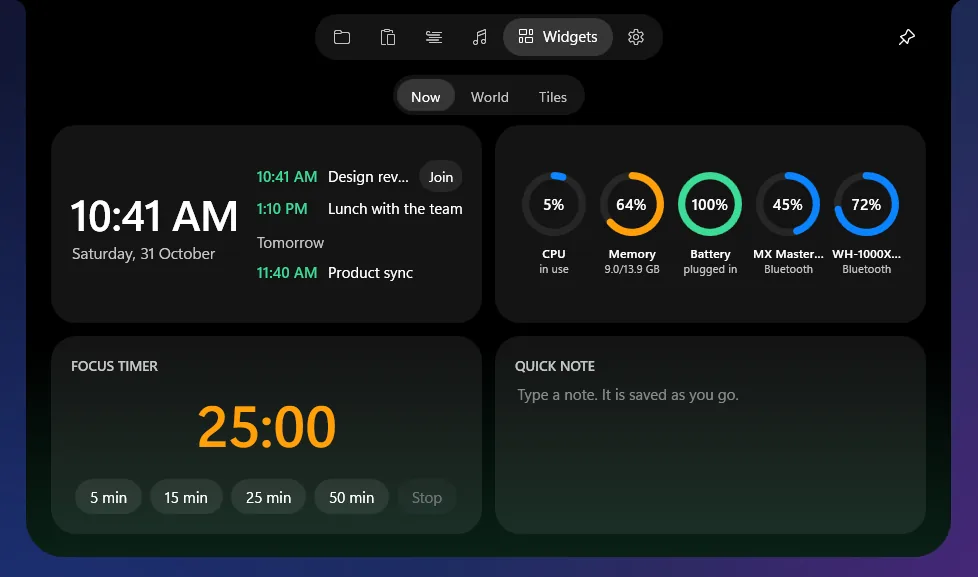
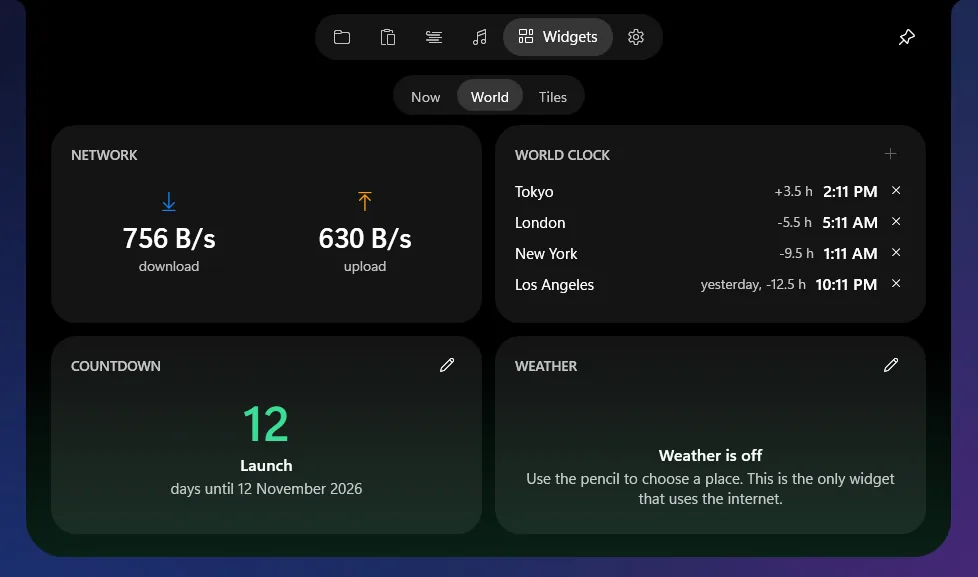
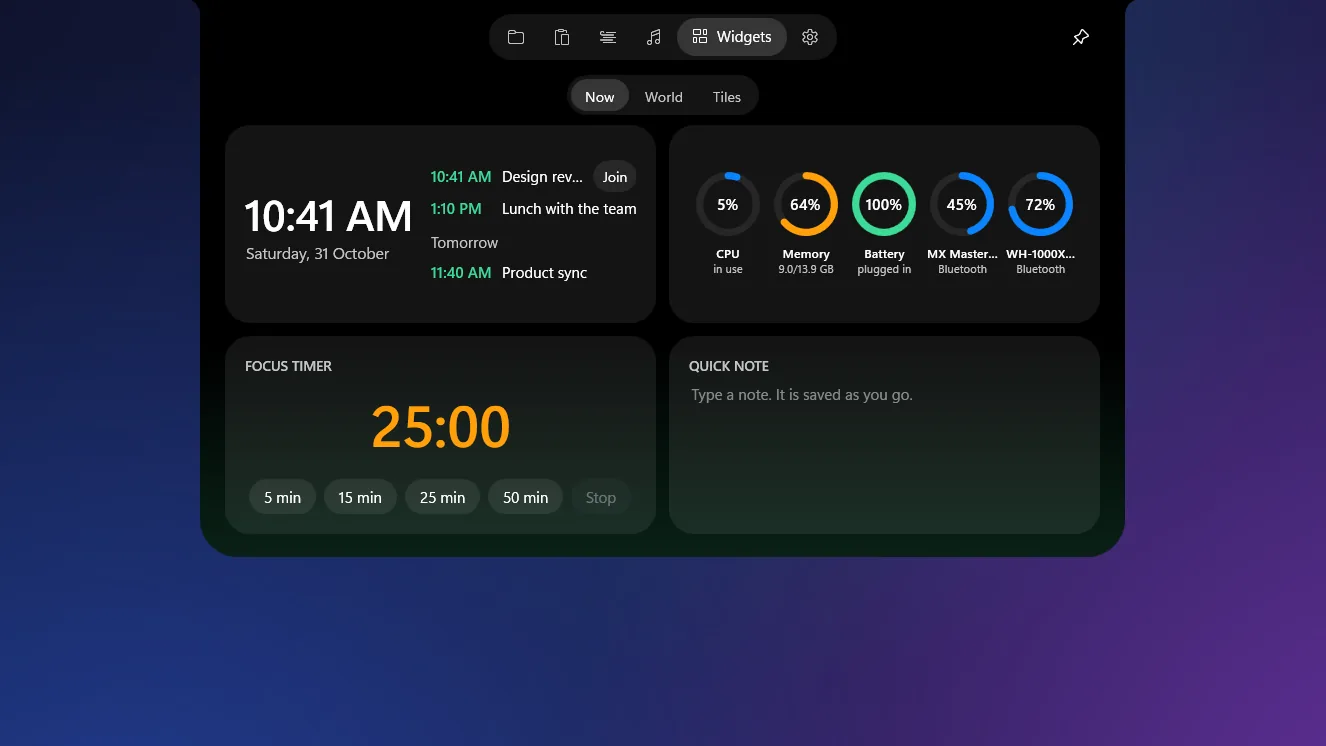
Clock and date with your agenda and the next meeting (with a Join button), battery, CPU and memory, the battery of connected Bluetooth headphones and devices, network, world clocks, a countdown, a timer with Pomodoro, a quick note, and weather if you want it.

  • The agenda reads the calendars Windows already has, and never changes them
  • Weather is off until you choose a place
Dockie’s widgets: the time and date beside today’s agenda with a Join button on the next meeting, rings for CPU, memory, battery and two Bluetooth devices, a focus timer and a quick note.
Dockie’s second widget page: network download and upload speed, world clocks for Tokyo, London, New York and Los Angeles, a countdown, and the weather widget, which is off until a place is chosen.

06TilesPro

Tiles for scripts and AI agents.

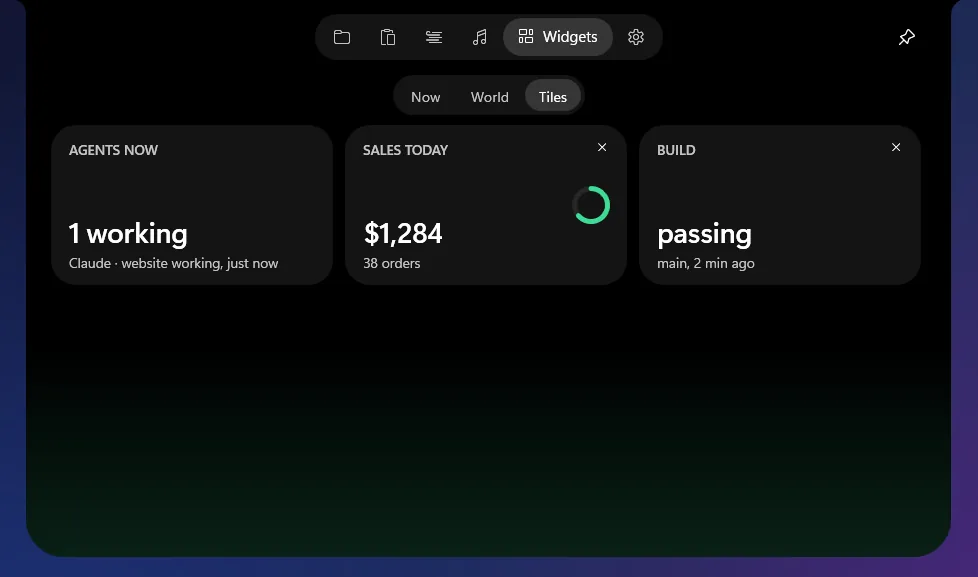
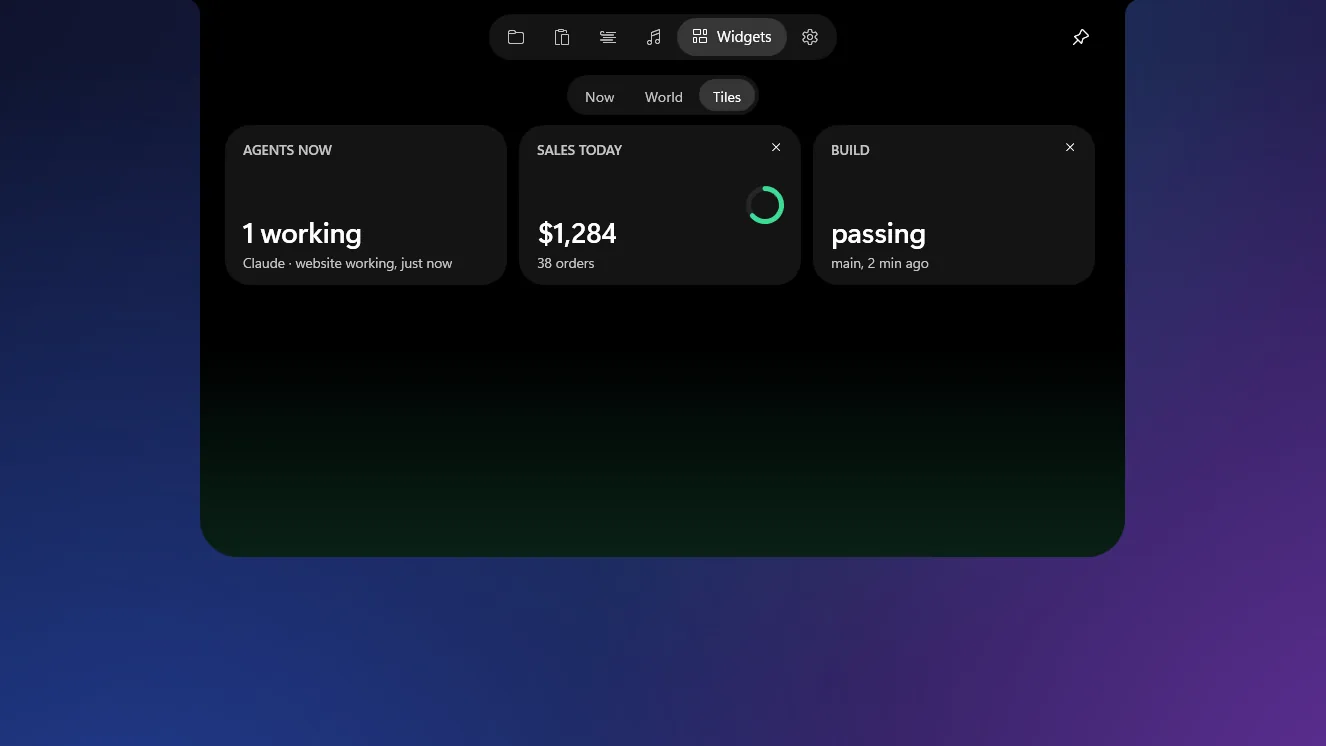
Show a number from any script (a build result, sales today) and live usage of AI coding agents (Claude Code, Codex, pi), with the pill telling you when one finishes or needs you.

  • A tile from any script’s output
  • Live usage of Claude Code, Codex and pi
  • The pill tells you when an agent finishes or needs you

Agent tiles read only counters and timestamps from the session files those tools write on your PC. Dockie never reads the text of those conversations.

Dockie’s tiles: one showing an AI coding agent at work, one showing sales today from a script, and one showing a build passing.

07PhonePro

Phone notifications in the pill.

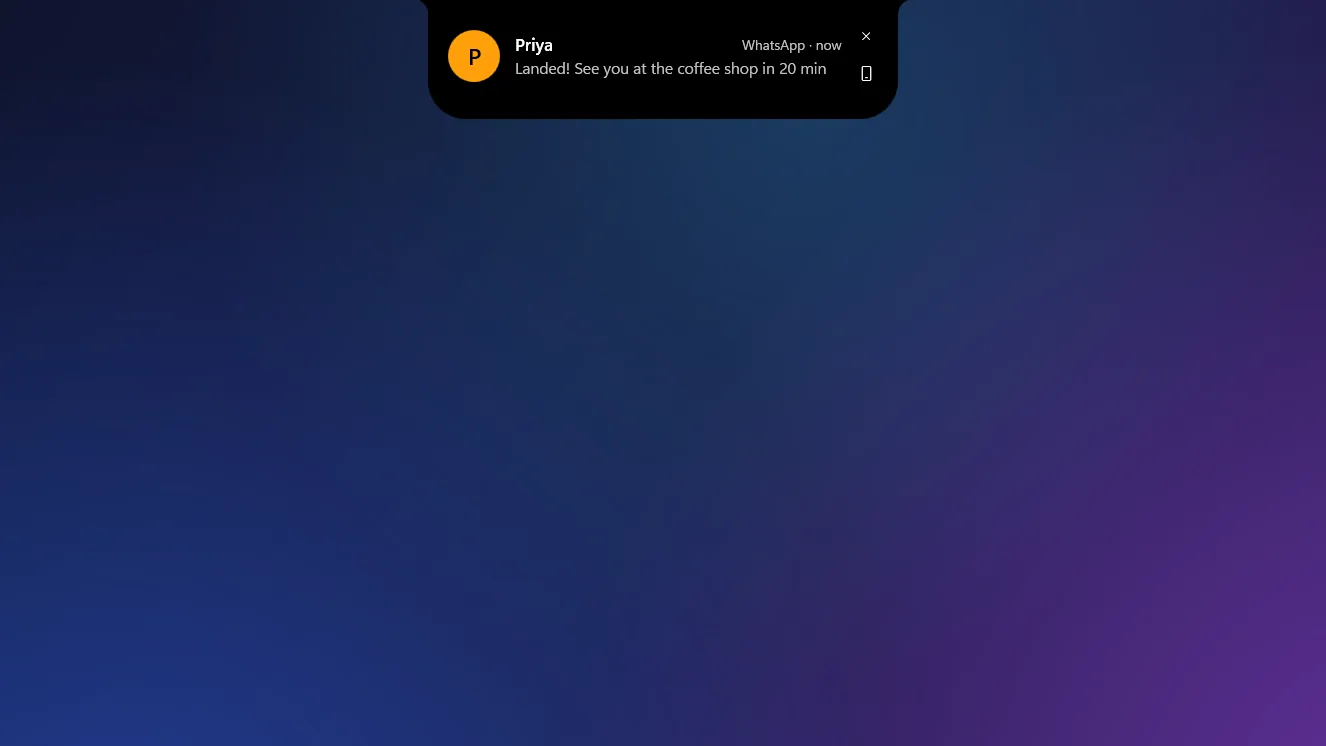
Notifications Phone Link brings from your phone show in the pill for a moment, and those you missed wait behind a chip. Off until you turn it on.

  • Windows asks your permission first
  • Notifications from other apps are not looked at
  • Nothing is stored or sent
The Dockie pill at the top of the screen showing a phone notification from a messaging app, with a close button and a phone mark.

08Settings

Stays out of the way.

The island never takes the keyboard from the app you’re using, and it hides while a game, video or presentation is fullscreen.

  • Point at the pill to open it, or press Ctrl+Alt+Space
  • Starts with Windows; turn that off in Dockie’s settings or Task Manager
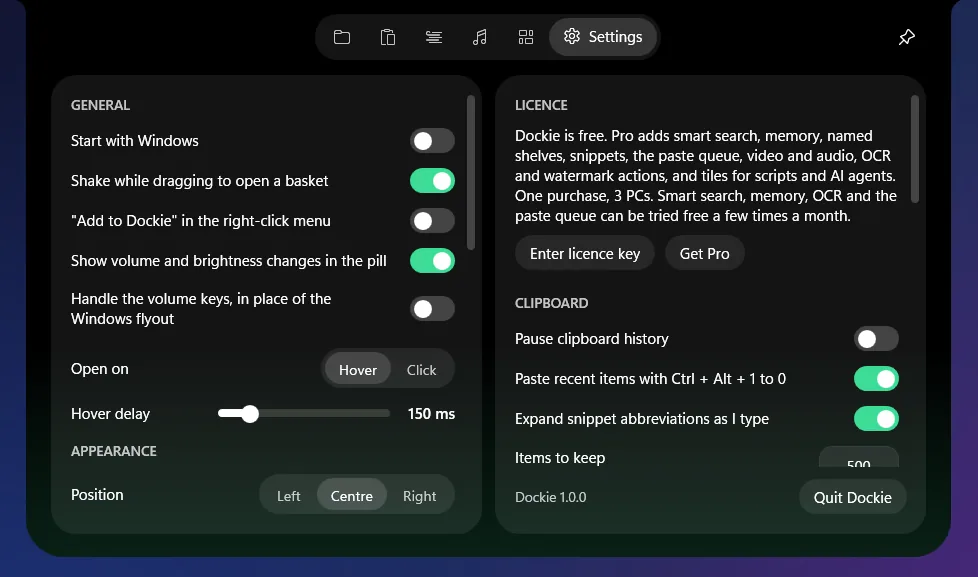
Dockie’s settings: start with Windows, shake while dragging to open a basket, open on hover or click, hover delay and position, beside the licence and clipboard settings.

Free and Pro

Free to use. Pro, once.

Dockie is free. Dockie Pro is an optional one-time unlock, sold through our own checkout by Dodo Payments.

Dockie

Free

From the Microsoft Store

  • File shelf with picture, PDF, zip and QR actions
  • Encrypted clipboard history and quick paste
  • Media, volume and microphone controls
  • Every widget, including agenda and weather
Get it from Microsoft (opens the Microsoft Store in a new tab)

Dockie Pro

$9.99once, tax included

One key for 3 PCs. No subscription.

  • Everything in Free
  • Memory and smart search by meaning
  • Snippets, paste queue and named shelves
  • Video and audio, OCR and watermarks
  • Tiles for scripts and AI coding agents
  • Phone notifications in the pill

Buy it from Get Pro in Dockie’s Settings tab, then enter the key under Licence. 14-day money-back guarantee (refund policy).

Free and Pro, feature by feature

What Dockie includes for free and with Dockie Pro
FeatureFreePro
Island and shelf
The island at the top of the screen, opened by pointing or a shortcutIncludedIncluded
File shelf with drag out, shake-to-open basket, pins and sharingIncludedIncluded
Named shelvesNot includedIncluded
Quick actions, all on your PC
Zip, convert pictures (including HEIC), resize, compress, strip location dataIncludedIncluded
Merge or split PDFs, pictures to PDF, QR codesIncludedIncluded
Video and audio: convert, compress, target file size (uses ffmpeg)Not includedIncluded
Text from pictures (OCR) and watermarksNot includedIncluded
Clipboard and Memory
Clipboard history of text, links, pictures and files, encrypted on your PCIncludedIncluded
Quick paste of the last ten clips with a shortcutIncludedIncluded
Snippets with abbreviations, and a paste queueNot includedIncluded
Smart search by meaning, pictures included, running on your PCNot includedIncluded
Memory that keeps what you choose and finds it by words or meaningNot includedIncluded
Media, widgets and the pill
Now playing, master and per-app volume, output device switchIncludedIncluded
Microphone and camera marks, and a mute shortcut for every appIncludedIncluded
Widgets: clock, agenda with Join, batteries, CPU, network, world clocks, timer, Pomodoro, note, weatherIncludedIncluded
Tiles from scripts and live AI coding agent usageNot includedIncluded
Phone notifications in the pillNot includedIncluded

Private by design

What you copy and drop never leaves your PC.

No account, no ads and no telemetry. We don’t collect, see or sell what you copy, drop and play.

  • No account, no ads, no telemetry

    Dockie has no telemetry, no analytics, no ads and no account.

  • Encrypted on your PC

    Clipboard history and Memory are encrypted with your Windows account (Windows DPAPI). Items that password managers mark as private are never recorded.

  • Searching stays local

    Smart search builds its index on your PC with a model running on your PC. Text in pictures and PDFs is read with the text recognition built into Windows.

  • Read, never stored or sent

    Your next meetings and, if you turn them on, phone notifications are read on your PC to show them in the pill, without being stored or sent.

When Dockie goes online

Only in these cases. No information about your files, clipboard, media or usage is ever sent to us.

  1. 01

    Dockie Pro

    Activating a key sends the key and your PC’s name to Dodo Payments’ licence service. About once a week the key and activation ID are sent to check the key is still valid.

  2. 02

    Smart search (off by default)

    Downloads the EmbeddingGemma model files once. Nothing you copied or dropped is sent.

  3. 03

    Weather (off by default)

    The place name you type, then its coordinates, are sent to Open-Meteo to get the forecast.

  4. 04

    Links you choose to open

    Such as “Get Pro” or a meeting’s Join button, in your browser or meeting app.

  5. 05

    Rating Dockie

    Once, after Dockie has been useful several times, it may show the Microsoft Store’s own rating prompt. What you write there goes to Microsoft.

Read the privacy policy

System requirements

What you need.

Windows
Windows 10 version 2004 (build 19041) or later, including Windows 11
Processor
x64
Video and audio actions
Need ffmpeg installed on your PC. Dockie does not include it, and says so when it is missing.
HEIC photos
Need the HEIF Image Extensions from the Microsoft Store
Smart search
Downloads its model (about 320 MB) only after you turn it on
Dockie Pro
An internet connection once, to activate the licence key

FAQ

Questions.

Something else? Email support@thryveapps.in.

Is Dockie free?

Yes. Dockie is free to download and use. Dockie Pro is an optional one-time unlock: $9.99, tax included, with one key for 3 PCs.

How do I open the island?

The island is the pill at the top centre of your main screen. Point at it, or press Ctrl+Alt+Space, and it opens.

Does Dockie upload what I copy or drop?

No. What you copy and drop never leaves your PC, and the file actions run on your PC too. Dockie connects to the internet only to check a Pro licence, to download the smart search model or fetch the weather if you turn those on, to open links you choose, and once to show the Microsoft Store’s rating prompt.

Do I need an account?

No. Dockie has no account, no ads and no telemetry. Buying Dockie Pro gives you a licence key, which you enter in Dockie’s Settings tab under Licence.

Will it get in the way of games, videos or presentations?

The island never takes the keyboard from the app you’re using, and it hides while a game, video or presentation is fullscreen.

How does Dockie Pro work on more than one PC?

One key can be active on up to 3 PCs at a time. To move it, deactivate a PC in Settings > Licence > Deactivate this PC, then activate another. The licence doesn’t expire and includes updates released through the Microsoft Store for as long as we offer them.

Can I try Pro features before buying?

Some Pro features come with a few free tries each month, counted on your PC. If Dockie Pro isn’t right for you, email us within 14 days of purchase and we’ll refund it in full.

Why do video and audio actions need ffmpeg?

Dockie uses ffmpeg if it is installed on your PC, but does not include it. Without it, the video and audio actions say that it is missing.

Does Dockie change or delete my files?

Actions write new files next to the originals and leave the originals as they are, except that “Move” when dragging out (Shift) moves the file, as Windows does. Removing an item from the shelf never deletes the file.

How do phone notifications work?

They are a Pro feature, off until you turn them on. After Windows asks your permission, Dockie reads the notifications Phone Link brings to your PC and shows each new one in the pill. Notifications from other apps are not looked at, and nothing is stored or sent.

Is Dockie part of Thryve Pro?

No. Thryve Pro covers the four web apps. Dockie Pro is a separate one-time purchase, sold through Dodo Payments.

Point at the top of your screen.

Dockie is free from the Microsoft Store. Dockie Pro is $9.99 once, for 3 PCs.

Windows 10 version 2004 (build 19041) or later, including Windows 11. x64.